


The Symbology Specific Controls
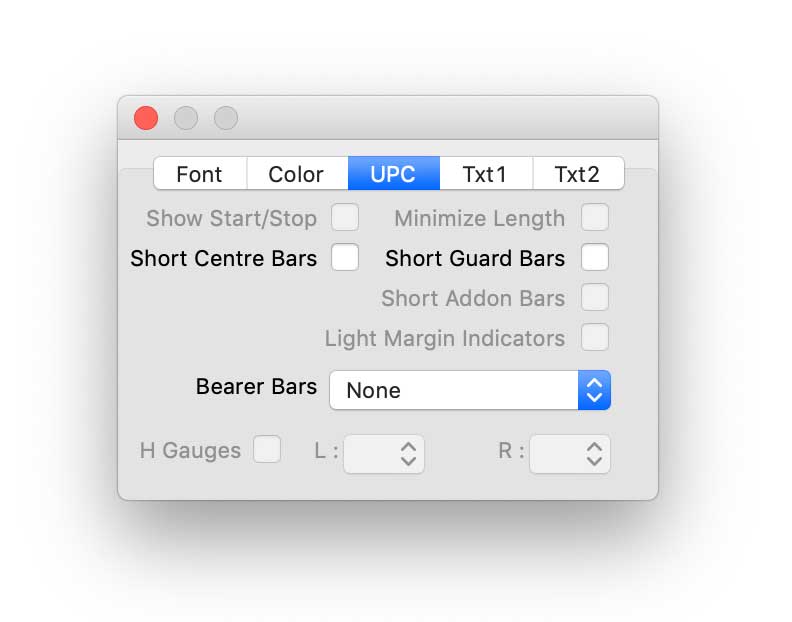
The Symbology Specific Controls panel has options relating to the particular type of barcode that has been selected. The panel is always named according to the symbology in use.
Show Start/Stop shows and hides the non-data start and stop characters for the Code 39 and Codabar symbologies.
The Minimize Length control is applicable to Code 128 only. This is used to (where possible) shorten the length of the bar code by mixing code subsets B and C.
The controls for shortening the Centre, Guard and Addon Bars are applicable to UPC, EAN, ISBN and ISSN barcode types.
Light Margin Indicators are symbols which indicate the extent of the mandatory "quiet zone" on each side of the barcode that is necessary to ensure that the symbol will scan. |
|
Bearer Bars are used to protect the barcode image from distortion on the printing press. There are 3 types of bearer bar that can be selected from the menu button: Enclosing, Abutting and Horizontal Rule.
H-Gauges These are used in some types of printing as a visual method of ensuring that the bar code image is being printed correctly. The left and right h-gauge widths are selected from the menu buttons. See the ITF section in About Barcodes for more information. |
|