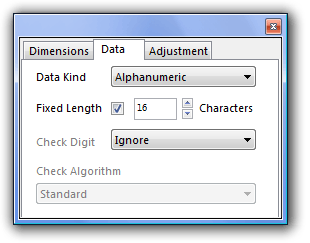
The Data panel has controls for setting the type of data that can be entered and the method of handling the Check Digit.
Data Kind - For alphanumeric barcode types such as Code 39, it is possible to limit data entry to numbers only.
Fixed Length
When the Fixed Length box is checked, WBC4 will only allow you to create barcodes of the specified length. You can set the number of digits by using the up and down arrows or typing a value into the field. This feature is only relevant when the barcode type you are using allows variable length codes, e.g. Code 39, Code 128, ITF Variable and Codabar.
Check Digit
The last digit of many bar codes is a "Check Digit". It does not form part of the meaningful data, but is used as safety feature. It is derived from a calculation applied to all of the other digits in the barcode. See the About Bar Codes section of this website for more information on how check digits are used within each code type. |