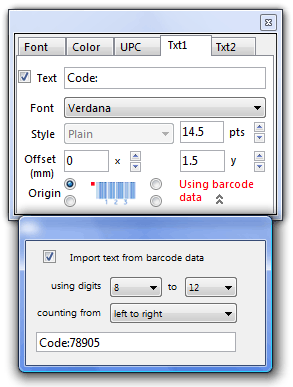
The Txt1 and Txt2 panels provide control over 2 optional text labels which can be positioned around the barcode.
The text entered in the edit field will appear on-screen and will be saved as part of the barcode image
You have control over the font, style, size, and position.
Position is determined by the x and y (horizontal and vertical) Offset values.
The Origin (or the point that you start measuring from) can be set to any of the four corners of the barcode.
As well as entering text directly, it is also possible to use part (or all) of the barcode data in your text labels.
When you click on the Use barcode data twist-down triangle, an extra panel appears: |
|